
Unity CLI 1.0.0-beta.5 arrived on 2026-08-13 with a small but useful change for automation: build, test and run processes now distinguish recognised signal failures from ordinary exit codes. The previous day's beta.4 added project-fleet commands, Editor verification and expanded build behavior.
Those updates matter less as a list of commands than as a contract. Structured output, predictable process results and terminal access make more of a Unity project observable outside the Editor. Unity's experimental Pipeline package goes further by letting teams expose project-specific commands to a running Editor or development Player.
For character teams, the immediate question is not, “How much can we automate?” It is, which checks are deterministic enough to trust before a human sees the performance?
Character delivery is not one kind of work
A character update can fail in ways that are easy to classify. The project may use the wrong Editor version. A package can be missing. A generated prefab may not exist. A reference can break. Compilation or a playback test can fail.
It can also fail in ways that require judgment. A gesture may arrive after the stressed word. Gaze may point at the wrong object. A structural content change may be technically valid but inappropriate for the scene. The character may compile and still feel wrong at the real camera distance.
Treating both groups as one automation problem produces brittle pipelines. Deterministic failures should stop the build early. Performance judgment should remain visible, contextual and accountable.
Use the Character Pipeline Automation Ladder
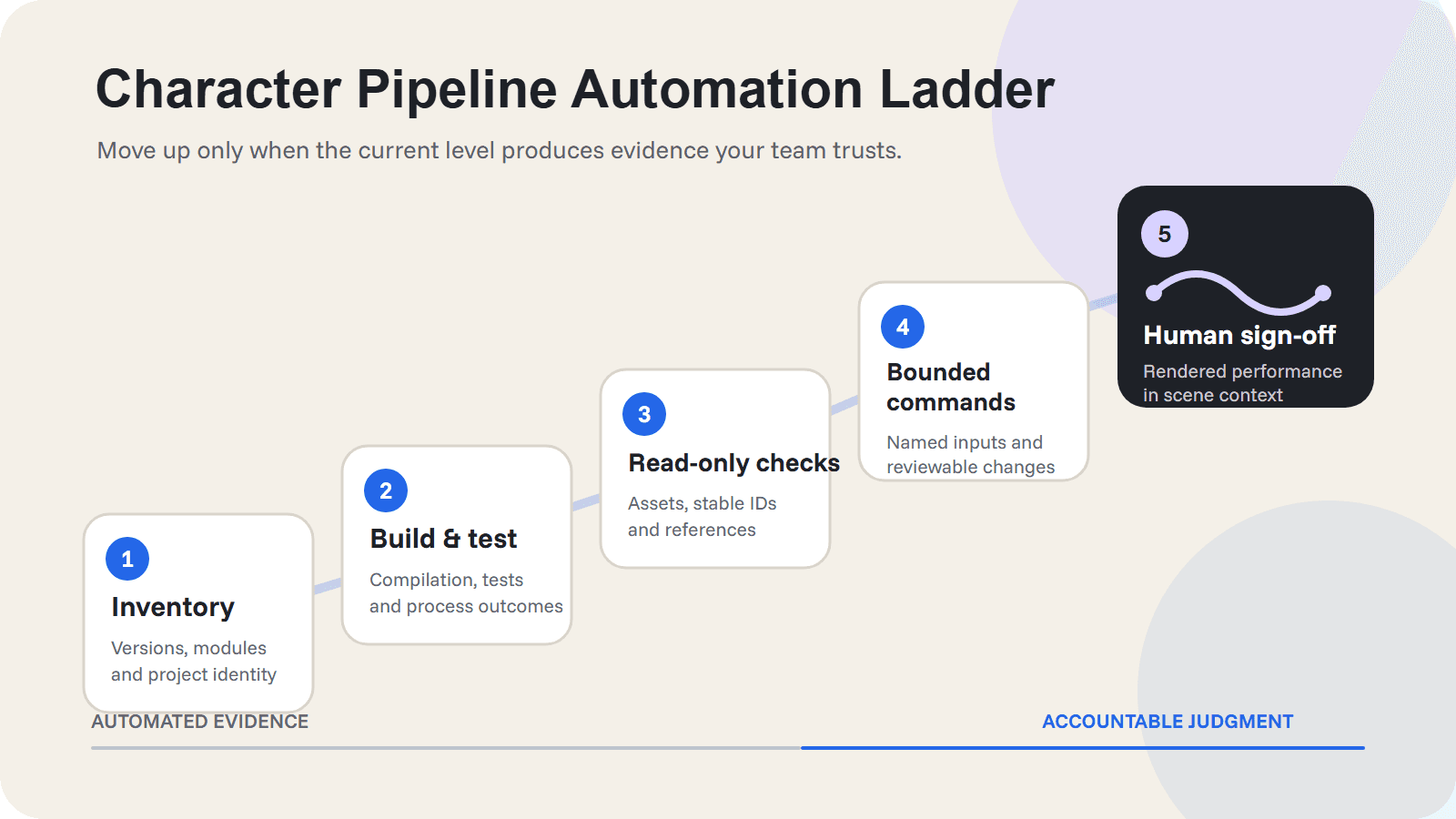
The safest adoption path is a five-level ladder. Each level earns the next by producing evidence the team can understand and reproduce.
Level | Automate | Evidence to keep | Human gate |
|---|---|---|---|
1. Inventory | Editor version, installed modules, package versions and project identity | Machine-readable inventory and pinned requirements | Approve supported version policy |
2. Build and test | Compilation, existing automated tests, target build and process outcomes | Exit code, logs, build artifact and test result | Review a new failure class before changing policy |
3. Read-only character checks | Expected folders, prefabs, raw assets, stable IDs and references | Pass, fail or unknown per check | Decide whether an unknown is safe to encode |
4. Bounded project commands | Explicit import, update or validation operations with narrow arguments | Command, inputs, changed assets and result | Approve the allowed mutation surface |
5. Rendered sign-off | Play-mode capture and scene-specific review package | Representative camera, audio, timing and event evidence | Approve performance and release |
The order matters. A team that cannot reliably identify its Editor and package state is not ready to give an agent broad access to the Asset Database. A project that cannot explain why a read-only check failed should not silently repair the result.
Start with inventory and deterministic delivery gates
Unity describes the CLI as experimental, but its first useful layer is deliberately ordinary: manage Editors and modules, produce JSON or TSV and return process results that scripts can interpret. That is enough to remove ambiguity from setup and CI before touching character content.
For a representative project, record:
the resolved Unity Editor version
required modules and package versions
the target platform and build profile
whether the project compiles
which automated tests ran
whether the Editor exited normally, failed a build or stopped on a recognised signal
This evidence should be boring. Boring is good. It lets a failed character build point to a specific environment or process condition instead of a vague “Unity failed” message.
Add read-only character checks before mutations
The next level should inspect expected delivery state without changing it. For a character pipeline, useful checks might include whether an approved prefab exists, whether required audio and animation assets are present and whether scene references resolve.
For a current Snippets Unity workflow, a bounded validator could check that published content was generated under Assets/My Snippets/<Snippet Set Name>/, that expected prefabs and raw assets exist and that references survived an update. Snippets matches updates by stable Snippet ID, which supports persistent references. Structural changes, removals and renaming still need review.
That last sentence is the boundary. A stable update path reduces unnecessary breakage. It does not make every content revision safe to accept unattended.
For the broader ownership map around those assets, see A Practical Unity Character Animation Tool Stack. For the underlying scope decision, use Build or Buy a 3D Character Performance Pipeline for Unity?
Expose narrow commands, not a blank cheque
Unity's experimental Pipeline package lets a project expose static methods as terminal commands. This is a better first interface than unrestricted live evaluation because the team can name an operation, constrain its arguments and define its result.
A useful character command should answer one production question. Examples include:
validate one published character set
report missing references without repairing them
import or update one explicitly named set
run one playback smoke test
capture the resulting asset changes for review
unity command eval is more powerful. Unity says it can evaluate C# in a running Editor and gates access with a security token. That flexibility may help diagnosis, but it is not the first surface to normalise in CI. Start with commands whose inputs, side effects and rollback path are already understood.
Also keep the environment boundary explicit. Unity describes runtime Pipeline access as localhost-only, off by default and intended for development or QA rather than production.
A worked boundary for one Snippets update
Snippets is a cloud-assisted production and Unity delivery layer for synchronized character performances. The current SDK can authenticate, list published Snippet Sets, import, update, remove and generate synchronized Unity assets. It is not a verified Unity CLI integration, and this article does not claim one.
The surrounding project could still apply the ladder to one normal update:
Confirm that the project uses a supported Snippets Unity version: Unity 2022.3 LTS, Unity 6.0 LTS or Unity 6.3 LTS. The experimental Unity Pipeline package itself requires Unity 6.0 LTS or newer, so a 2022.3 project stops before that level.
Compile the project and run its existing tests before changing content.
Inspect the expected generated folder, prefab, raw assets and stable-ID references.
If the project has an approved narrow command, update one named Snippet Set and record the changed assets.
Run a playback smoke test.
Review the performance in the representative scene, at the intended camera distance, with audio, gaze, facial and body motion plus runtime events in context.
The first five steps can produce machine-readable evidence. The sixth decides whether the result communicates the intended performance. Passing compilation does not answer that question.
What not to automate first
Avoid beginning with the largest possible control surface. In an early pilot, do not let automation:
run arbitrary mutation code across every project
repair missing references without recording the original failure
accept structural character-content changes because the project still compiles
commit generated asset changes without a reviewable diff
treat a development Player control path as a production runtime feature
publish or release because a smoke test passed
These restrictions are not anti-automation. They make automation diagnosable. A command should fail loudly when it reaches a decision that belongs to a technical director, animator or release owner.
Pilot one failure, then move up the ladder
Choose one representative character-content update and run it manually once. Record where the team loses time or confidence. If the first repeatable failure is an Editor mismatch, automate inventory. If it is a broken reference, add a read-only validator. If the same approved import step is repeated reliably, expose one narrow command.
Do not move up the ladder because the technology can. Move up when the current level produces evidence the team trusts.
Unity CLI makes a Unity project easier to observe and control from outside the Editor. For character pipelines, its best first use is a tighter validation boundary: machines prove that the delivery is technically intact, then people decide whether the performance is right.
Sources and evidence boundary
Unity, Meet the Unity CLI: manage Unity from your terminal, published 2026-07-20.
Unity, Introduction to the Unity command-line interface, accessed 2026-08-17.
Unity, Unity CLI release notes, beta.5 released 2026-08-13.
The Unity feature descriptions and compatibility statements are first-party source assertions. This article did not install or benchmark the Unity CLI or Pipeline package, did not test a Snippets project through them and does not claim a current Snippets integration. Both Unity tools are experimental and should be rechecked before publication or production adoption.
Written by Cristian Anton
