Product
9 MIN READ
A Practical Unity Character Animation Tool Stack: What Each Tool Should Own

Choosing a Unity character-animation stack is not the same as choosing the best animation app. A production character may depend on a rig, captured or generated motion, facial behavior, dialogue logic, performance timing, review controls and engine-side playback. Those jobs can live in one platform or several tools, but each needs a clear owner.
The practical answer is to map the workflow in five layers: narrative and interaction logic, dialogue-performance authoring, motion and facial sources, character and rig preparation and Unity delivery. Then test the handoffs with one real scene and one real revision. A tool belongs in the stack only when the team can show what enters it, what leaves it and who owns the result.
That approach is more useful than a generic ranking. It lets a small team use a focused stack without pretending one product solves every job. It also gives a larger team a way to see where approvals, formats and ownership can break.
Start with responsibilities, not brands
Before comparing products, write one sentence for each responsibility the project actually needs. A dialogue-heavy training scene might require:
branching and scenario state;
approved script and voice;
lip-sync, face, body, gaze and timing;
a character and facial rig that can receive the performance;
review and revision without rebuilding unrelated work;
Unity assets, sequencing, subtitles and runtime triggers; and
a repeatable update path after the content changes.
Do not let two tools silently own the same approval. If dialogue text changes in one system while audio timing and animation remain approved in another, the stack needs a version contract between them. If two applications can both retarget motion, decide which result is authoritative. Overlap can be useful. Ambiguous ownership is not.
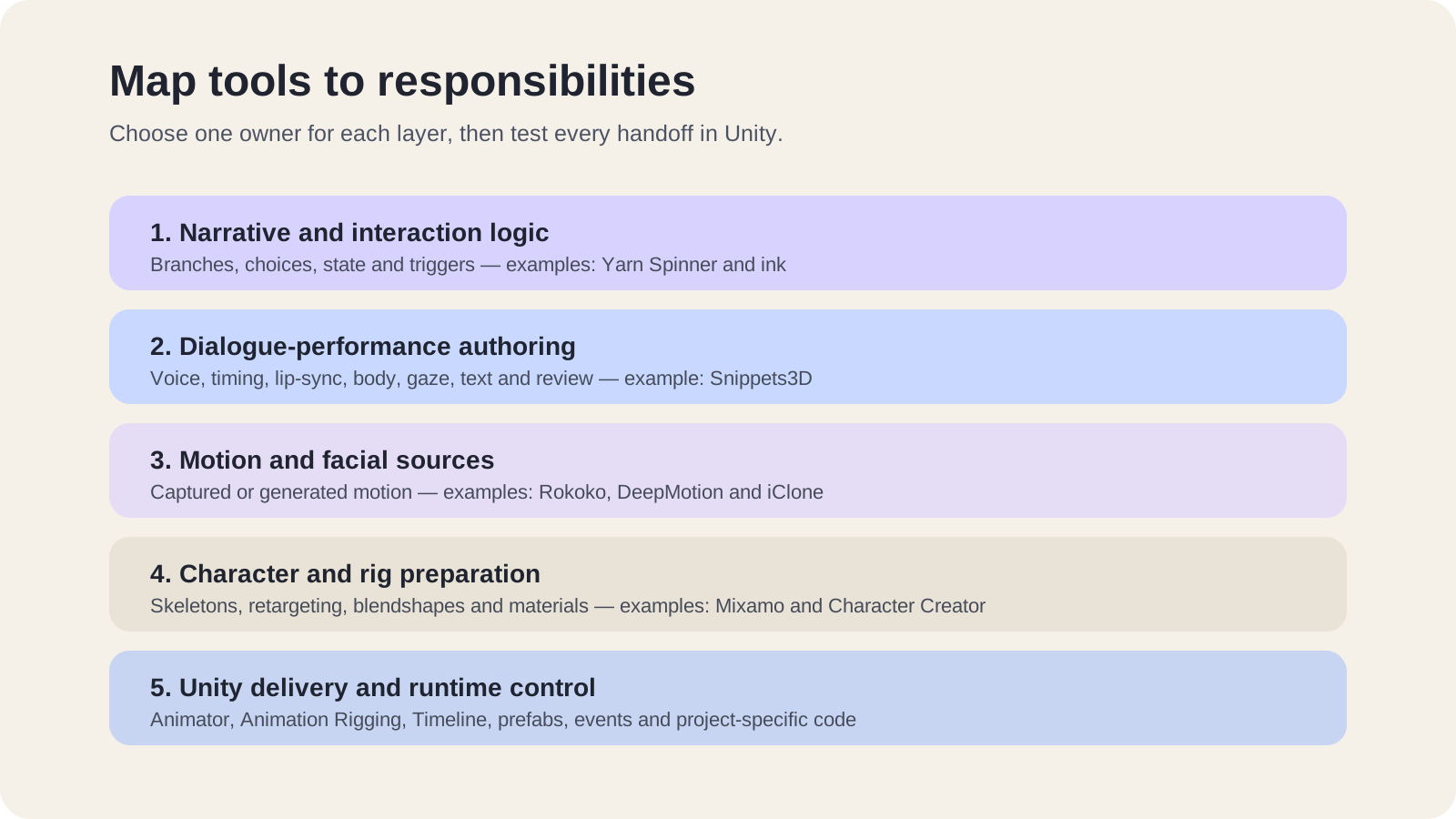
The five-layer Unity character-animation stack
1. Narrative and interaction logic
This layer decides what happens next: branches, choices, conditions, scenario state and triggers. It should call a character performance, not be confused with the performance itself.
Yarn Spinner for Unity is a narrative scripting system with a documented Unity integration. ink's Unity integration provides a Unity package, story runtime and tools for compiling, playing and debugging ink stories. Either can own narrative flow when its model fits the project.
The handoff question is simple: can the narrative system request a stable performance or event without needing to know how every voice, facial or body channel was produced?
2. Dialogue-performance authoring
This layer turns an approved line or recording into the coordinated moment the audience sees and hears. Depending on the project, that moment may include voice, word timing, lip-sync, facial expression, body motion, gaze, pauses, text, subtitles and runtime events.
Snippets operates here. It is a controllable production layer for creating and delivering synchronized 3D character performances in Unity. Teams can create from scripts, prompts or recorded audio, preview and refine content in a browser, publish a Snippet Set and import or update generated assets through the Unity SDK.
The boundary matters. Snippets does not decide narrative branches, run a free-form NPC brain or own scoring and analytics. It also does not remove the need to validate the project's character and facial rig. Use it when controlled dialogue performance and a browser-to-Unity update path are the missing responsibilities, not as a universal replacement for every character tool.
3. Motion and facial sources
Captured or generated motion can feed a broader character workflow. The right source depends on what must be performed, the available people and hardware, the character and the cleanup the team can support.
Rokoko Studio's Unity documentation describes a path for livestreaming motion data to a custom Humanoid character through the Rokoko Live plugin. Its face-capture path has a stated ARKit blendshape assumption, which makes the target facial setup part of the evaluation.
DeepMotion Animate 3D offers a video-to-3D-motion API with FBX, BVH and other output formats. Its vendor page lists markerless body, hand and face tracking plus retargeting. Treat those as reasons to run a representative test, not as proof that a particular clip, rig or production volume will meet the project's standard.
Reallusion's Unity pipeline connects Character Creator, iClone and ActorCore roles across character creation, motion capture, animation editing and Unity setup. That can be useful when a team wants more of the character and animation workflow under one vendor, but the same handoff rule applies: validate the actual character, facial data, materials, animation clips and revision path.
4. Character and rig preparation
Animation data is useful only when the target character can receive it correctly. This layer owns the skeleton, humanoid mapping, retargeting assumptions, facial blendshapes, materials and any project-specific constraints.
Adobe Mixamo documents automatic rigging for uploaded characters and the application of animations to a mapped skeleton. It can be a practical starting point for prototypes or suitable humanoid assets. A successful Mixamo result still does not prove that a custom production rig, facial setup or non-humanoid character will fit.
Character Creator and its Unity pipeline cover a broader character-preparation route. Inside Unity, the Animation Rigging package adds constraint-based rig behavior such as inverse kinematics and aim constraints. These tools solve different parts of the job: preparing a character, transferring motion and adding engine-side procedural control should not be collapsed into one vague “rigging” checkbox.
5. Unity delivery and runtime control
Unity is where the stack has to become a working product. The Animator system owns clips, controllers, transitions and runtime playback. Animation Rigging can add constraints and procedural adjustments. Timeline can sequence cinematic, gameplay and audio content. Project code, prefabs and narrative systems decide when a performance runs and what follows it.
An export file is not the end of this layer. Unity readiness means the intended character performs in the representative scene, through the real runtime trigger, with its dependencies and references intact. The team must also know what happens when the source content changes.
Use a handoff contract between every layer
For each connection in the stack, record five things:
Input: the script, audio, animation, character, event or state that enters the layer.
Output: the exact asset, identifier, clip, prefab or runtime call that leaves it.
Owner: the person or discipline responsible for approving that output.
Version rule: how the next layer knows which approved version it received.
Revision rule: what must be regenerated, reimported or re-reviewed when the source changes.
This small contract exposes hidden production work. A body clip may arrive as FBX, but somebody still owns retargeting and cleanup. A narrative line may have a stable ID, but the performance layer still needs a rule for matching that ID to the approved audio and animation. A generated prefab may update in place, but structural changes can still require reference review.
Run one scene through the complete stack
Use the same proof task for every serious stack option. Choose a short scene that includes dialogue, one meaningful pause, one gesture or gaze beat, subtitles if required and a runtime trigger. Use the real target character rather than a vendor sample whenever possible.
Then run this sequence:
Trigger the line through the intended narrative or application logic.
Produce the complete visible and audible performance.
Deliver it to the target character in a representative Unity scene.
Ask a reviewer for one bounded change, such as a shorter pause or a different gesture.
Apply the revision without rebuilding unrelated approved work.
Update Unity and confirm that references, playback, subtitles and events still behave correctly.
Record every manual step, workaround, failed assumption and unresolved owner.
Do not convert one successful proof into a universal conclusion. Record the Unity version, character, facial setup, scene, tool versions and revision scope. The test establishes evidence for that path. A larger pilot may still be necessary for volume, collaboration, localization, runtime performance or deployment constraints.
How to choose the final stack
Start with hard gates. If the target character cannot receive the required performance, the deployment model is unacceptable or the Unity update path breaks, convenient features elsewhere should not average the failure away.
Among viable options, prefer the smallest stack that keeps approvals and revisions visible. One broader platform may reduce handoffs. Several specialist tools may provide better control for a mature team. Neither structure is automatically better. The deciding evidence is whether the same scene can move from approved intent to a revised Unity result without hidden ownership or fragile reassembly.
For a separate five-gate evaluation framework, read How to Choose Character Animation Tools for a Unity Project. If the missing layer is controlled dialogue-performance authoring and Unity delivery, explore Snippets.
Frequently asked questions
Can one tool own several layers?
Yes. A broader platform can own several responsibilities and reduce handoffs. Still record the boundaries inside the platform: who approves narrative logic, character setup, performance and Unity delivery and what happens when one layer changes.
Does FBX export prove that a tool is ready for Unity production?
No. FBX can move character or animation data, but the project still needs to validate import settings, humanoid mapping, facial data, materials, scale, runtime control, references and the update path.
Should narrative logic and performance authoring use the same system?
Only when the system genuinely owns both jobs and the team wants that coupling. A clean interface between a narrative system and stable performance assets is often easier to test and replace than a workflow where branching logic and animation state are mixed informally.
Is Snippets a replacement for motion capture or character creation?
No. Snippets owns controlled dialogue-performance creation and Unity delivery for compatible characters. Motion capture, character creation, custom rig validation, branching logic, scoring, analytics and other surrounding-product responsibilities remain separate unless the project supplies them elsewhere.
Written by Cristian Anton
